Dreamcatcher Coloring Pages: A Graphic Design Asset Worth Exploring
As a seasoned digital product creator, I’ve reviewed countless design assets for use in print-on-demand, Etsy shops, and creative marketplaces. When I first came across Dreamcatcher Coloring Pages, the visual appeal was clear — but how well would it translate into sellable products? Let’s take a closer look from a practical, business-oriented perspective.
First Impressions: Niche Appeal and Visual Personality
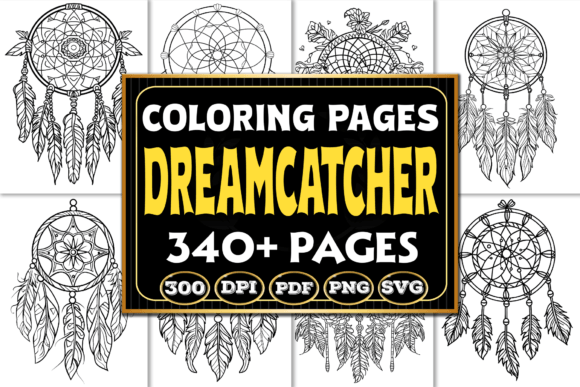
The Dreamcatcher Coloring Pages bundle immediately evokes a sense of whimsy and creativity. The black-and-white aesthetic gives it a clean, timeless feel that works well with both modern and rustic themes. Dreamcatchers are often associated with mindfulness, bohemian style, and spiritual wellness, making this asset ideal for audiences interested in self-care, meditation, or cozy home décor.
This design doesn’t scream boldness or minimalism — instead, it sits comfortably in a space that blends decorative charm with subtle elegance. It feels like the kind of graphic that could easily become a staple in a handmade business or a Canva template collection aimed at content creators who want to infuse their designs with a personal touch.
Real-World Applications for Digital Sellers
One of the biggest questions when evaluating a new design is: where will it work best? Here’s how I see Dreamcatcher Coloring Pages fitting into different product types:
- Printable Wall Art: Perfect for an instant digital download. Buyers love easy-to-print, high-quality illustrations that can be framed or used in DIY projects.
- Cricut Projects: With SVG files included, these dreamcatcher designs are great for cutting machines. They’re intricate enough to add character without being overly complicated for beginners.
- Sticker Designs: The line art allows for easy customization and layering, especially if you're selling planner stickers or themed sticker packs.
- T-Shirt and Merch Graphics: The motifs are versatile enough to be stylized as t-shirt graphics or mug designs, especially when paired with soft pastel colors or minimalist color palettes.
- Seasonal Bundles: These pages can be repurposed into seasonal collections by adding relevant accents — think autumn leaves, holiday stars, or springtime florals.
- Social Media Templates: Use them in background elements for Instagram posts, Pinterest pins, or blog headers. They add texture and interest without overwhelming the viewer.
I also see potential for clipart bundles and digital paper packs. If you're targeting scrapbooking enthusiasts or planners, these can serve as filler patterns or accent pieces. For Shopify sellers and print-on-demand platforms, they offer a quick way to build out a cohesive theme across multiple items.
Testing Before Launch: What to Look For
Before publishing any listing using Dreamcatcher Coloring Pages, it's essential to test how it performs in real scenarios. Here are my top recommendations:
- Mockup Previews: Place the design on a few mockups — white T-shirts, mugs, and wall art. This helps visualize the final product and ensures the lines remain crisp and legible.
- Thumbnail Appeal: Check how the design looks as a small preview image. If it loses detail or clarity, consider simplifying or highlighting key elements.
- Background Compatibility: Test the PNGs on both light and dark backgrounds. Since the bundle is black and white, contrast becomes critical for visibility.
- SVG Cutting Quality: If you're planning Cricut or Silhouette projects, open the SVG files in your software and run a dry cut. Make sure there are no overlapping layers or broken paths.
- Print Color Accuracy: Download the PDF and do a trial print. Confirm that the black ink is consistent and that the file resolution holds up under pressure.
Also, consider pairing the designs with different font styles — serif for sophistication, sans-serif for modernity, script for handcrafted vibes, and display fonts for bold statements. Each combination can change the perceived value and audience of your product.
Where This Design Shines
Dreamcatcher Coloring Pages works best in large-format previews and thematic product listings. Its ornate details are more visible and impactful when given room to breathe. Here are some specific areas where it excels:
- Large Product Previews: The detailed nature of the design makes it stand out in larger sizes, such as posters or canvas prints.
- Themed Bundles: Group it with other calming or boho-inspired assets for a cohesive look in your design bundle offerings.
- Decorative Layouts: Ideal for nursery prints, greeting cards, or gift tags where a gentle, artistic vibe is desired.
- Merchandise Graphics: Especially for sublimation or screen printing where solid, high-contrast lines matter.
- Handmade Business Assets: Fits well in small business branding materials, packaging design, or even as part of a brand identity kit.
Use With Caution: Potential Pitfalls
While Dreamcatcher Coloring Pages has a lot going for it, there are certain applications where it might not perform as expected. For example:
- Tiny Sticker Details: The fine lines may become hard to cut or print clearly at smaller sizes.
- Overly Complex Layouts: If your design already has a lot going on, adding these pages could create clutter and reduce readability.
- Low-Resolution Prints: Always verify the file resolution before using it in physical products. Low res can lead to blurry or pixelated results.
- Crowded Thumbnails: In marketplace listings, too much detail can make the thumbnail appear busy and unappealing at a glance.
- Dark Backgrounds: Without proper contrast, the black-and-white format may lose its impact. Consider tinting or adjusting opacity for better visibility.
For those creating text-heavy templates, like quote cards or promotional visuals, keep in mind that the design should complement rather than overpower the message. Also, ensure that all PNG files have transparent backgrounds if you're using them for layered designs or overlay effects.
Enhancing Your Creative Marketplace Listings
If you're looking to boost your creative marketplace presence, Dreamcatcher Coloring Pages can help increase perceived value and customer trust. The inclusion of 340 files in various formats (PNG, SVG, PDF) gives buyers flexibility, which is always a plus for digital downloads.
When building a product listing, organize the files clearly so customers know what they’re getting. Include examples of how the designs can be used — maybe show a sample of a completed coloring page or a mockup of a printed poster. Highlighting the interior layout (8.5” x 11”) is also helpful for those planning printable products or KDP book covers.
Commercial License and File Integrity
One of the most important aspects of any commercial design is licensing. Before listing anything based on Dreamcatcher Coloring Pages, confirm that the commercial license permits resale of finished products. This step is non-negotiable for Etsy sellers, Shopify stores, and print-on-demand businesses.
Additionally, inspect the file integrity. Are the SVGs editable and scalable? Do the PNGs maintain transparency correctly? Is the final PDF file properly formatted for immediate use? These checks prevent post-purchase complaints and reinforce your reputation as a reliable seller.
Final Thoughts for Digital Product Creators
Dreamcatcher Coloring Pages is a versatile graphic design asset that brings a touch of artistry and calm to digital products. Whether you're creating printable designs for a mindfulness-themed shop or incorporating it into planner stickers, the possibilities are broad and appealing.
But don’t just rely on the description. Put it through the paces — test it on mockups, try it in thumbnails, and see how it responds to different color schemes and layouts. Only then will you understand whether it truly supports your brand consistency and meets the expectations of your target audience.
Ultimately, if you're aiming for a professional-looking online product collection, this design can be a valuable addition — especially when used thoughtfully and with attention to detail.